ETHERNET CABLE

Ethernet cable, a CAT5 or Category 5 is a description of network cabling that consists of four twisted pairs of copper wire terminated by an RJ-45 connector. Cat5 has a maximum length of 100m, exceeding this length without the aid of bridge or other network device could cause network issues. The picture shows an example of what a CAT5 cable may look like with the connector, as well as the other end of the cable with each of the wires it contains.

NETWORK

A network is a collection of computers, servers, mainframes, network devices, peripherals, or other devices connected to one another to allow the sharing of data. A excellent example of a network is the Internet, which connects millions of people all over the world. Below is an example image of a home network with multiple computers and other network devices all connected to each other and the Internet.

MICROSOFT OFFICE

Office or Microsoft Office is a collection or package of software programs developed and published by Microsoft. Office is used in the business and educational environments, for creating word processing documents, spreadsheets, and presentations. Although this collection is referred to as Office, it is more appropriate to include the version of Office, like Office 2003 or Office 2010.

DUAL BOOT

Dual-boot is a term used to describe a computer that utilizes two operating systems. For example, with a dual-boot you could have Windows 8 and Mac OS X on the same machine. The concept of installing more than two operating systems is referred to as a multi-boot. Some examples of software that assist with a dual-boot include Acronis Disk Director for Windows, Apple boot camp for Mac, and GRUB for Linux users. These programs allow users to pick which operating system they want to load as the computer is starting up

UBUNTU(linux) and WINDOW

Just like Windows XP, Windows 7, Windows 8, and Mac OS X, Linux is an operating system. An operating system is software that manages all of the hardware resources associated with your desktop or laptop. To put it simply – the operating system manages the communication between your software and your hardware. Without the operating system (often referred to as the “OS”), the software wouldn’t function.

Tuesday, 10 January 2017

Basic Hardware Components

 Basic Hardware Components

  • Arithmetic/logic unit
    • Contains the electronic circuitry necessary to perform arithmetic and logical operations on data.
  • Communications Devices
    • Enable a computer to connect to other computers. Devices that enable a computer to connect to other components; includes modems and network interface cards.
  • Control Unit
    • The component in any computing system that works in coordinatin with the central processing unit to instruct, maintain and control the flow of information.
  • Central Processing Unit (CPU)
    • The component in any computing system that represents the circuitry necessary to interpret and execute program instructions, it consists of the Control Unit, arithmetic/logic unit and the controller..  It is the corollary to the brain in organic systems. 
  • Hardware
    • Equipment that inputs, processes, outputs, and stores data.  It consists of input devices, a system unit, output devices, storage devices, and communication devices.
  • Input Devices
    • Any computer peripheral used to enter data and/or control signals into a computer system. Some devices, such as modems, are capabile of both input as well as output.
    • Examples of Input Devices
      • Biofeedback Input Devices—special equipment like gloves, body suits, and eyeglasses to translate movements, temperature, or skin-based electrical signals
      • Digital Camera—record photographs in the form of digital data that can be stored on a computer.
      • Digitizer—converts points, lines, and curves from a sketch, drawing, or photograph to digital impulses and transmits them to a computer
      • Electronic Whiteboard—captures anything drawn on special whiteboard
      • Joystick—uses the movement of a vertical stem to direct the pointer.  These are often used with computer games and have buttons you can press to activate events, depending upon the software.
      • Graphics Tablet—similar to a digitizer, but it also contains unique characters and commands that can be generated automatically by the person using the tablet
      • Image Scanner (page scanner)– an input device that can electronically capture an entire page of text or images such as photographs or art work.
      • Keyboard—most commonly used input device.  You enter data by pressing keys on the keyboard
      • Light Pen—used by touching it on the display to create or modify graphics
      • Microphone—used to record sound.
      • Modem—a device that converts data into a form suitable for both receipt and transmission by wire or radio such that it can be reconstructed at the destination point.
      • Mouse—a small palm-sized input device that you move across a flat surface to control the movement of the pointer on the screen
      • Pen Input—used to  (1) input data using hand-written characters and shapes that the computer can recognize (2) as a pointing device like a mouse to select items on the screen, and (3) to gesture (special symbols made with the pen that issue a command)
      • Optical Recognition Devices—use a light source to read codes, marks, and characters and convert them into digital data that can be processed by a computer
      • Pointing Stick (trackpoint or isometric pointing device)—a small device shaped like a pencil eraser that moves the insertion point as pressure is applied to the device
      • Terminals—consist of a keyboard and a screen - commonly used for special purpose input such as POS (Point-of Sale) information entry.
      • Touchpad (trackpad)—a flat rectangular surface that senses the movement of a finger on its surface to control the movement of the insertion point
      • Touch Screen—allows you to touch areas of the screen with your fingers to enter data.
      • Trackball—A pointing device like a mouse only with the ball on the top of the device instead of the bottom
  • ­Laptop or Notebook or Netbook
    • A portable, integrated device in which the central processing unit (CPU), storage (hard disk and/or memory), input system (keyboard, trackpad, etc.), display and various data input and output channels (USB, Firewire, Ethernet, WiFi, etc.) are combined in a self-contained unit. Laptop or Notebook or Netbook computers are generally smaller than desktop computers, lending to their portability.
  • Machine cycle
    • Machine Cycle or Processor Cycle or Instruction Cycle: the most basic logical mode of operation in a central processing unit (CPU). It consists of four steps that are "executed" continuously at a very high rate of speed: fetch, decode, execute and store. Only one execution cycle per machine cycle may be performed.
  • Memory
    • Integrated circuits that temporarily store program instructions and data that can be retrieved.  Basic unit of memory is a byte.
    • RAM (Random Access Memory) – a volatile form of memory, RAM generally functions as a computers "desktop" - the space in which data that is actively under review and/or manipulation can be processed.  As a result and as a general rule, the more RAM with which a computer is fitted, the more and faster data can be viewed and manipulated.  RAM needs to be cyclically "refreshed" from an outside power source in order to maintain the information contained therein.  When external power is removed, the data contents held in RAM disappears.  For this reason, RAM is sometimes referred to as short term memory.
    • ROM (Read Only Memory) – a non-volatile form of memory, ROM stores data that does not commonly change, like startup instructions and data used when a computer if first turned on.
    • CMOS –used to store information about the computer system, such as the amount of memory, the type of keyboard and monitors, and the type and capacity of disk drives.
  • Output Devices
    • Devices that convert the results of processed data into a form that can be used and understood by the user.  A computer display is an example of an output device, as is a printer.  Whereas a computer display uses a screen to present visual information in virtual form, a printer produces hardcopy - a tangible form of the data or information. Audio speakers are another form of output device, converting electronic programming into human-audible sound.  Some devices are capable of being output as well as input devices.
    • Examples of Output Devices
      • Computer display or monitor
      • Plotter- Designed for line drawing; often used for computer-aided design; some units can handle large paper sizes
      • Modem—a device that converts data into a form suitable for both receipt and transmission by wire or radio such that it can be reconstructed at the destination point.
      • Multifunction Devices—Combines printer, fax, scanner, and copier
      • Printers
      • Projectors
  • Palmtop, PDA or PIM
    • Commonly the smallest of computing platforms, these are highly portable computing devices used primarily to organize task, contact, communications and other personally oriented information and data. These systems often have many of the same resources as a Laptop or Netbook computer: a CPU, storage, input system, display and one or more data input/output (I/O) channels. These devices can be purpose-built, or can have other primary functions, with smartphones being a good example of such a multifunction device.
  • Peripheral Devices
    • A general term for any device connected to the system unit .
  • Storage Devices
    • Store instructions and data when they are not being used by the system unit.
    • Examples of Storage Devices
      • CD-ROM (compact disk read-only) — a smaller optical disk that can store about 450 times the data on a floppy
      • Data Cartridges—removable hard disk drives that provide both the storage capacity and fast access
      • Floppy disk/drive—a flexible platter coated with material that allows data to be recorded magnetically on the surface of the platters.
      • Hard Disk—one or more rigid platters coated with material that allows data to be recorded magnetically on the surface of the platters.
      • Smart Cards—size of credit card and contain a thin microprocessor capable of storing data. They are used as attendance tracking cards, identification cards, telephone cards, etc
      • Tape Cartidges—containing a long ribbon of plastic, one side of which is coated with a material that can be magnetized to record the binary codes that represent data.
  • System Unit
    • Box-like case that contains the electronic circuits that cause the processing of data to occur. Part of the computer system where the computing is done.  This is where the computer programs are executed and the data is manipulated.  It consists of the Central Processing Unit (CPU), memory (Random Access Memory-RAM), and other electronics.

TYPES OF COMPUTER

                                 TYPES OF COMPUTER

Since the advent of the first computer different types and sizes of computers are offering different services. Computers can be as big as occupying a large building and as small as a laptop or a micro-controller in mobile & embedded systems.

The four basic types of computers are as under:
  1. Supercomputer
  2. Mainframe Computer
  3. Minicomputer
  4. Microcomputer


Supercomputer

The most powerful computers in terms of performance and data processing are the Supercomputers. These are specialized and task specific computers used by large organizations. These computers are used for research and exploration purposes, like NASA uses supercomputers for launching space shuttles, controlling them and for space exploration purpose.
The supercomputers are very expensive and very large in size. It can be accommodated in large air-conditioned rooms; some super computers can span an entire building.
Uses of Supercomputers
In Pakistan Supercomputers are used by Educational Institutes like NUST for research purposes. Pakistan Atomic Energy commission & Heavy Industry Taxila uses supercomputers for Research purposes. 

Space Exploration

Supercomputers are used to study the origin of the universe, the dark-matters. For these studies scientist use IBM’s powerful supercomputer “Roadrunner” at National Laboratory Los Alamos.

Earthquake studies

Supercomputers are used to study the Earthquakes phenomenon. Besides that supercomputers are used for natural resources exploration, like natural gas, petroleum, coal, etc.

Weather Forecasting

Supercomputers are used for weather forecasting, and to study the nature and extent of Hurricanes, Rainfalls, windstorms, etc.

Nuclear weapons testing

Supercomputers are used to run weapon simulation that can test the Range, accuracy & impact of Nuclear weapons.   
Popular Supercomputers
  • IBM’s Sequoia, in United States
  • Fujitsu’s K Computer in Japan
  • IBM’s Mira in United States
  • IBM’s SuperMUC in Germany
  • NUDT Tianhe-1A in China


Mainframe computer

Although Mainframes are not as powerful as supercomputers, but certainly they are quite expensive nonetheless, and many large firms & government organizations uses Mainframes to run their business operations. The Mainframe computers can be accommodated in large air-conditioned rooms because of its size. Super-computers are the fastest computers with large data storage capacity, Mainframes can also process & store large amount of data. Banks educational institutions & insurance companies use mainframe computers to store data about their customers, students & insurance policy holders.

Popular Mainframe computers

  • Fujitsu’s ICL VME
  • Hitachi’s Z800


Minicomputer

Minicomputers are used by small businesses & firms. Minicomputers are also called as “Midrange Computers”. These are small machines and can be accommodated on a disk with not as processing and data storage capabilities as super-computers & Mainframes. These computers are not designed for a single user. Individual departments of a large company or organizations use Mini-computers for specific purposes. For example, a production department can use Mini-computers for monitoring certain production process.
Popular Minicomputers
  • K-202
  • Texas Instrument TI-990
  • SDS-92
  • IBM Midrange computers


                       Microcomputer

Desktop computers, laptops, personal digital assistant (PDA), tablets & smartphones are all types of microcomputers. The micro-computers are widely used & the fastest growing computers. These computers are the cheapest among the other three types of computers. The Micro-computers are specially designed for general usage like entertainment, education and work purposes. Well known manufacturers of Micro-computer are Dell, Apple, Samsung, Sony & Toshiba.
Desktop computers, Gaming consoles, Sound & Navigation system of a car, Netbooks, Notebooks, PDA’s, Tablet PC’s, Smartphones, Calculators are all type of Microcomputers.

A BRIEF COMPUTER HISTORY

         
A BRIEF COMPUTER HISTORY

The computer as we know it today had its beginning with a 19th century English mathematics professor name Charles Babbage.
He designed the Analytical Engine and it was this design that the basic framework of the computers of today are based on.
Generally speaking, computers can be classified into three generations. Each generation lasted for a certain period of
time,and each gave us either a new and improved computer or an improvement to the existing computer.

First generation: 1937 – 1946 - In 1937 the first electronic digital computer was built by Dr. John V. Atanasoff and Clifford Berry. It was called the Atanasoff-Berry Computer (ABC). In 1943 an electronic computer name the Colossus was built for the military. Other developments continued until in 1946 the first general– purpose digital computer, the Electronic Numerical Integrator and Computer (ENIAC) was built. It is said that this computer weighed 30 tons, and had 18,000 vacuum tubes which was used for processing. When this computer was turned on for the first time lights dim in sections of Philadelphia. Computers of this generation could only perform single task, and they had no operating system.

Second generation: 1947 – 1962 - This generation of computers used transistors instead of vacuum tubes which were more reliable. In 1951 the first computer for commercial use was introduced to the public; the Universal Automatic Computer (UNIVAC 1). In 1953 the International Business Machine (IBM) 650 and 700 series computers made their mark in the computer world. During this generation of computers over 100 computer programming languages were developed, computers had memory and operating systems. Storage media such as tape and disk were in use also were printers for output.

Third generation: 1963 - present - The invention of integrated circuit brought us the third generation of computers. With this invention computers became smaller, more powerful more reliable and they are able to run many different programs at the same time. In1980 Microsoft Disk Operating System (MS-Dos) was born and in 1981 IBM introduced the personal computer (PC) for home and office use. Three years later Apple gave us the Macintosh computer with its icon driven interface and the 90s gave us Windows operating system.
As a result of the various improvements to the development of the computer we have seen the computer being used in all areas of life. It is a very useful tool that will continue to experience new development as time passes

Computer Overview

Computer Overview

A computer is an electronic device that can perform a variety of operations through a set of instructions called programs. The computation using machines got started in early 3000 BC. Charles Babbage designed Difference Engine and Analytical Engine. The computers can be classified based on the technology being used as Digital, Analog and Hybrid. Super computers are the fastest computers with huge processing capacity.

Computer works in three steps, generally known as INPUT-PROCESS-OUTPUT cycle. Every task given to a computer follows an IPO cycle. It needs certain input, processes that input and produces the desired output. Memory  
 is the part of the computer that holds data and instructions for processing. A central processing unit, also known as microprocessor is a complete computation engine that is assembled on a single chip.

Future computers are based on artificial intelligence. The idea of artificial intelligence came about to develop computers that could think, behave and respond in the same way that human do. Computer comprises of many internal components and in order for these components to communicate with each other, a bus is used for that purpose. Booting is a process or set of operations that loads and hence starts the operating system, starting from the point when user switches on the power button
.

Thursday, 5 January 2017

Operating System Scheduling algorithms


Operating System Scheduling algorithms


A Process Scheduler schedules different processes to be assigned to the CPU based on particular scheduling algorithms. There are six popular process scheduling algorithms which we are going to discuss in this chapter −
  • First-Come, First-Served (FCFS) Scheduling

  • Shortest-Job-Next (SJN) Scheduling

  • Priority Scheduling

  • Shortest Remaining Time
  • Round Robin(RR) Scheduling
  • Multiple-Level Queues Scheduling
These algorithms are either non-preemptive or preemptive. Non-preemptive algorithms are designed so that once a process enters the running state, it cannot be preempted until it completes its allotted time, whereas the preemptive scheduling is based on priority where a scheduler may preempt a low priority running process anytime when a high priority process enters into a ready state.

First Come First Serve (FCFS)

  • Jobs are executed on first come, first serve basis.
  • It is a non-preemptive, pre-emptive scheduling algorithm.
  • Easy to understand and implement.
  • Its implementation is based on FIFO queue.
  • Poor in performance as average wait time is high.
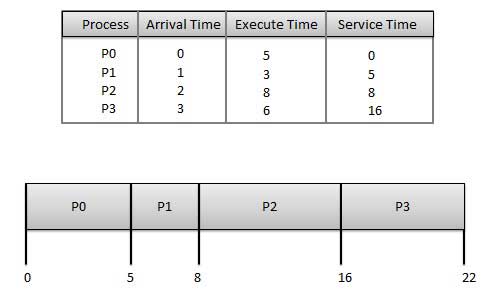
First Come First Serve Scheduling Algorithm
Wait time of each process is as follows −
ProcessWait Time : Service Time - Arrival Time
P00 - 0 = 0
P15 - 1 = 4
P28 - 2 = 6
P316 - 3 = 13
Average Wait Time: (0+4+6+13) / 4 = 5.75

Shortest Job Next (SJN)

  • This is also known as shortest job first, or SJF
  • This is a non-preemptive, pre-emptive scheduling algorithm.
  • Best approach to minimize waiting time.
  • Easy to implement in Batch systems where required CPU time is known in advance.
  • Impossible to implement in interactive systems where required CPU time is not known.
  • The processer should know in advance how much time process will take.
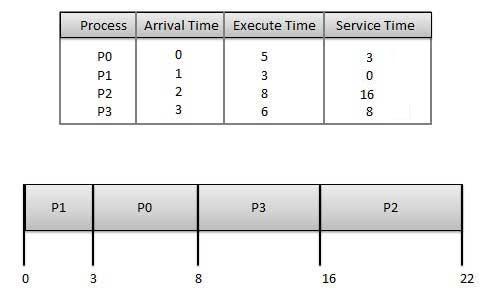
Shortest Job First Scheduling Algorithm
Wait time of each process is as follows −
ProcessWait Time : Service Time - Arrival Time
P03 - 0 = 3
P10 - 0 = 0
P216 - 2 = 14
P38 - 3 = 5
Average Wait Time: (3+0+14+5) / 4 = 5.50

Priority Based Scheduling

  • Priority scheduling is a non-preemptive algorithm and one of the most common scheduling algorithms in batch systems.
  • Each process is assigned a priority. Process with highest priority is to be executed first and so on.
  • Processes with same priority are executed on first come first served basis.
  • Priority can be decided based on memory requirements, time requirements or any other resource requirement.
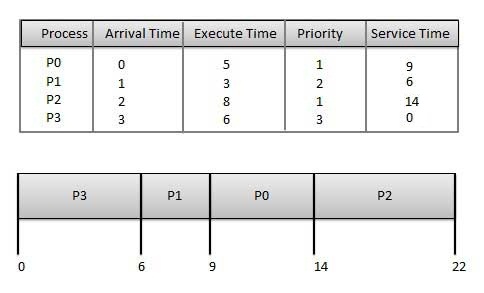
Priority Scheduling Algorithm
Wait time of each process is as follows −
ProcessWait Time : Service Time - Arrival Time
P09 - 0 = 9
P16 - 1 = 5
P214 - 2 = 12
P30 - 0 = 0
Average Wait Time: (9+5+12+0) / 4 = 6.5

Shortest Remaining Time

  • Shortest remaining time (SRT) is the preemptive version of the SJN algorithm.
  • The processor is allocated to the job closest to completion but it can be preempted by a newer ready job with shorter time to completion.
  • Impossible to implement in interactive systems where required CPU time is not known.
  • It is often used in batch environments where short jobs need to give preference.

Round Robin Scheduling

  • Round Robin is the preemptive process scheduling algorithm.
  • Each process is provided a fix time to execute, it is called a quantum.
  • Once a process is executed for a given time period, it is preempted and other process executes for a given time period.
  • Context switching is used to save states of preempted processes.
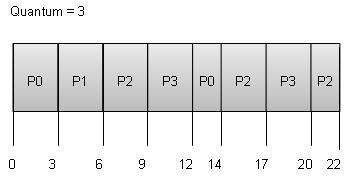
Round Robin Scheduling Algorithm
Wait time of each process is as follows −
ProcessWait Time : Service Time - Arrival Time
P0(0 - 0) + (12 - 3) = 9
P1(3 - 1) = 2
P2(6 - 2) + (14 - 9) + (20 - 17) = 12
P3(9 - 3) + (17 - 12) = 11
Average Wait Time: (9+2+12+11) / 4 = 8.5

Multiple-Level Queues Scheduling

Multiple-level queues are not an independent scheduling algorithm. They make use of other existing algorithms to group and schedule jobs with common characteristics.
  • Multiple queues are maintained for processes with common characteristics.
  • Each queue can have its own scheduling algorithms.
  • Priorities are assigned to each queue.
For example, CPU-bound jobs can be scheduled in one queue and all I/O-bound jobs in another queue. The Process Scheduler then alternately selects jobs from each queue and assigns them to the CPU based on the algorithm assigned to the queue.